Sintérgica AI
Lattice Kaná · Invite-only beta

Always-on agents. Your time, back.

Agents with a name, memory and a trade that handle your email, your calendar and your messages, use the browser for you and hand you the finished document. They ask before anything important and keep working when you are away.

  • September 15 to November 13, 2026
  • Mac with Apple Silicon · 64-bit Windows
  • Free for personal use with a local model · The cloud is paid
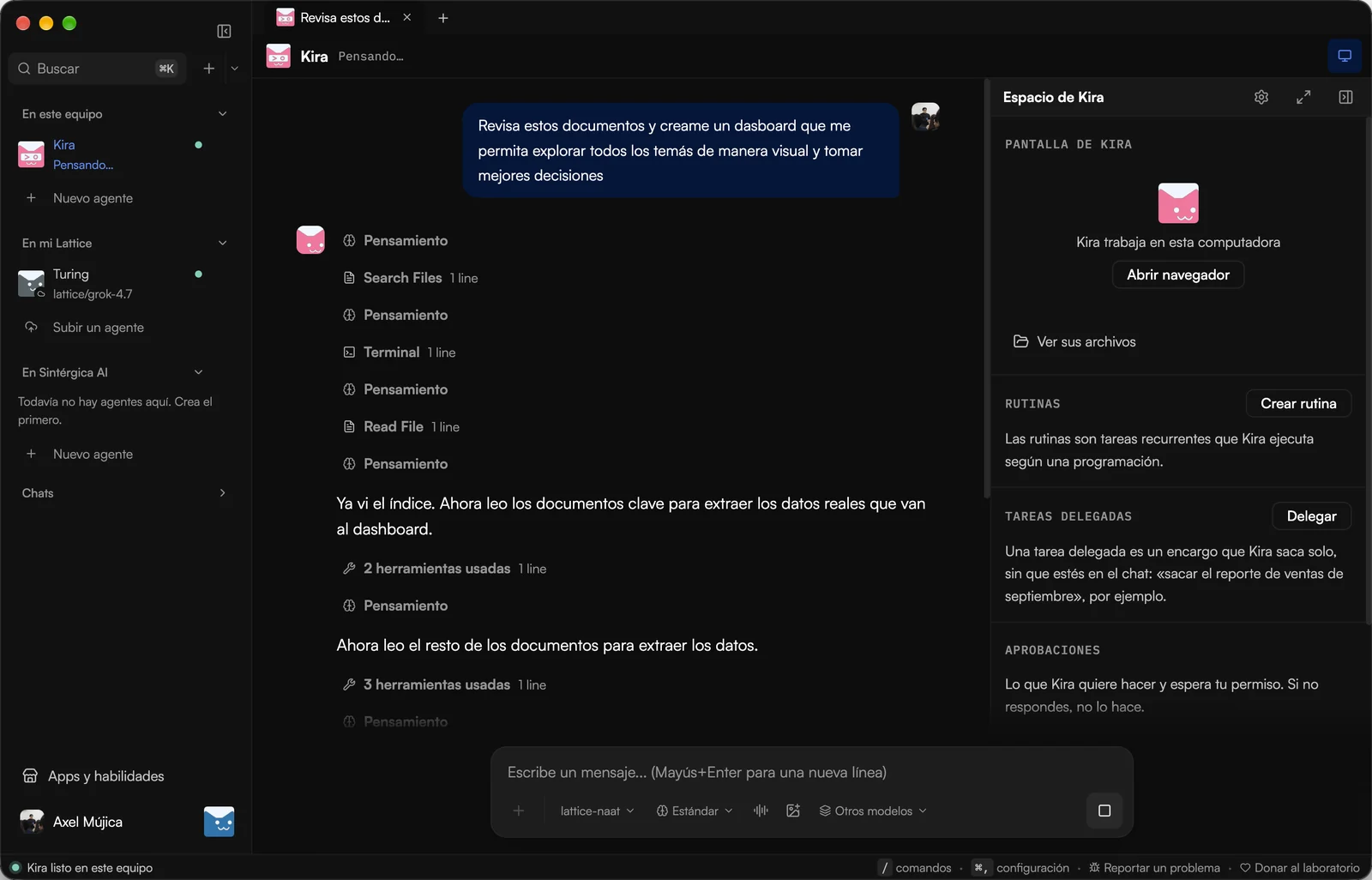
Lattice Kaná on Mac: Kira, an agent, reviews documents to build a dashboard while showing its work; on the right, its space with routines, delegated tasks and approvals
Language
Built in Spanish first
Control
Asks before anything important
Price
Free with a local model; the cloud is paid
Deployment
On your machine, your server or the cloud
The problem

AI already writes well. The work is still yours.

You ask a chat to help with your reports and it gives you instructions. You copy, paste, open the portal, download, rename and ask again. The agents that do act usually want a server, a terminal and a card billed in dollars.

Lattice Kaná is the other option: agents that finish the whole task, in an app you install like any other.

How it works

Your first agent in three steps

  1. 01

    Redeem your code and download

    Enter your invite code in your Lattice account and download the app for Mac or Windows. The first time, a five-screen tour guides you.

  2. 02

    Choose where your agent lives

    Sign in with your Lattice account and use your cloud engine with nothing else to install, or install the engine on your computer.

  3. 03

    Give it a name and a trade

    Your first agent interviews you in the first chat: what you do, which tools you use and what you want done every week. From that it builds its persona and routines.

Who it is for

As useful on your own as across the whole company

The same app, two ways to use it.

Professionals

The assistant that actually does it

Install it, give it a name and hand it whatever eats your morning today. Free for personal use.

  • Sorts your email and your calendar and sets up the rest of the day.
  • Goes into the portals for you and leaves the table or the report ready.
  • Learns how you work and repeats it without you explaining it every week.
Request access
Companies

A team of agents per area

One engine for the whole organization, agents assigned per team and control over what each one can do.

  • Invitations by link: each person only sees the agents of their teams.
  • Approvals before sending, buying or deleting, in the chat or by email.
  • Role templates to build sub-agents, and the engine on your own server.
Talk to sales
What it does

From the request to the result, with you out of the middle

Three things a chat does not do: act, deliver and keep the routine.

You watch it use your systems

When your agent uses the browser you see it in its own panel: where it clicks, what it types and which page it opens. If a sign-in is needed, you take control, log in and hand it back.

  • Gets into portals and platforms even without an integration.
  • Works the same with the agent on your computer or in the cloud.
  • Passwords are not recorded: it only notes that you typed one.
Connections

It connects with what you already use

Your agent lives in the tools you already work in: your email, your calendar, your boards and your channels.

  • GmailComing soon
  • Google CalendarComing soon
  • Google DriveComing soon
  • Google SheetsComing soon
  • Zoom
  • Trello
  • Asana
  • Notion
  • HubSpot
  • Slack
  • WhatsApp
  • Telegram
  • Discord
  • GitHub
  • PostgreSQL
  • Meta AdsComing soon

And more from Discover, without touching a config file. Those marked as coming are awaiting authorization.

Where it runs

You decide where your agent works

The app is the same. What changes is where the engine runs.

ComparisonOn your computerIn the Lattice cloudOn your server
Who it is forPeople who want to try it or keep everything on their machinePeople who do not want to install or maintain anythingOrganizations that set it up with us as a project
What you installThe app and the engineJust the appThe app; the engine goes on your server and we set it up with you
Keeps working with your computer offNoYesYes
WhatsApp and TelegramNot from LatticeYes, from your accountWe set it up with you

Started on your computer? With "Move to cloud" you upload your agent to Lattice with its persona, memory and skills.

By area

Put the agents to work

Start with the task that repeats the most in your week.

You hand it

Document review and comparison

It compares a contract against your template, flags what departs from it and leaves the summary of changes next to the chat.

  • Summarizes long files and cites where each fact came from.
  • Builds comparison tables of clauses across versions.
  • Nothing is signed or sent without your approval.
Control

Private, governable and auditable

What an organization needs before letting an agent touch its operation.

Nothing important goes out without your approval

Before sending, paying or deleting, the agent asks. The card shows up in the chat and you decide right there.

Each agent in its lane

Agents assigned per team: the sales one does not see legal's work, and each person only sees their own.

The engine wherever you decide

Agents run on Azca, the Lattice agent engine, on your computer, on a server owned by your organization or in the cloud.

No lock-in on a model

Pick from hundreds of models, each with its provider in plain sight, and switch whenever you want.

Keep in mind that today the model decides which action counts as sensitive, not a fixed list you control.

Talk to sales
FAQ

What people ask us most

Fill in the access request on this page. We review every request and, when there is room in the beta, we email you your code.

Invite-only beta

Put your first agent to work.

If you already have a code, enter it and download the app. If not, leave us your details and we will let you know when there is room.

Beta access

Sep 15 to Nov 13, 2026

Tell us what you want to hand off. We review every request and email you your code.

Your computer

We only use your data to manage your access. Privacy notice

Have a code? Enter it now

Free for personal use · Mac and Windows · Spanish, English and Portuguese